
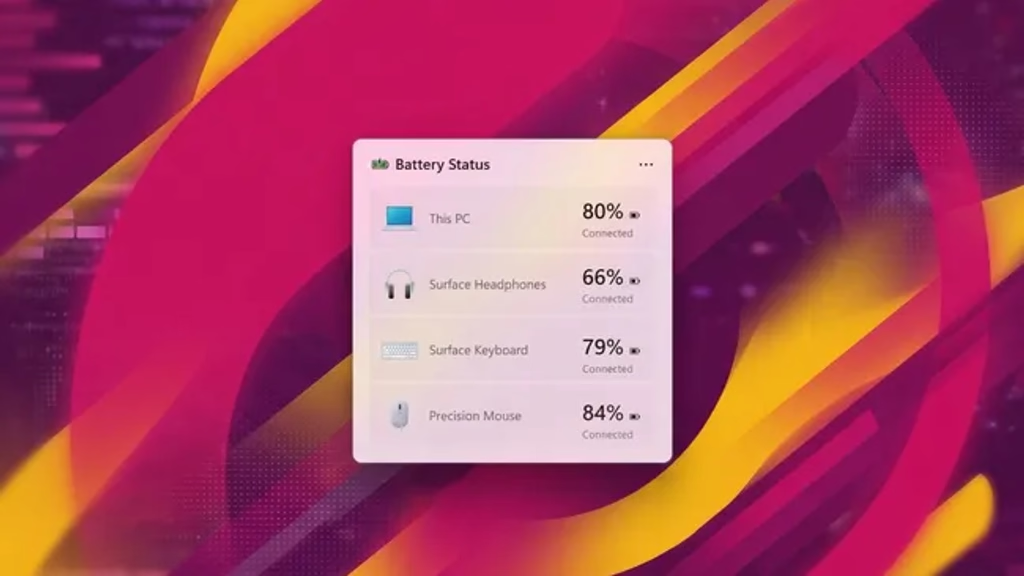
Microsoft is quietly building a system-wide battery widget for Windows 11, and once you connect it to what’s happening elsewhere in the OS, it looks less like a one-off feature and more like a small piece of a much larger push.
What’s Actually Coming
References to the widget turned up in recent Windows 11 preview builds and were first flagged on Discord before Windows Central reported on them. It’s not functional yet — no toggle, no working build — but the strings and visual assets already baked into the OS make its design fairly clear.
The widget will live in two places: the Widgets Board and the lock screen. It shows devices as a vertical list, with the PC’s own battery at the top followed by connected wireless peripherals — mice, keyboards, headsets, and similar accessories — each with its own icon, name, and battery percentage. It can also flag whether a device is currently charging and whether Energy Saver is switched on for it, and it comes in both light and dark variants.
Windows 11 isn’t breaking new ground here; both Android and iOS have offered comparable multi-device battery overviews for years. But for the Widgets Board specifically, this could matter more than it sounds. The board has had a rough time finding a purpose since it launched in 2021 — coverage across multiple outlets points to only a handful of apps (Phone Link, OneDrive, and Weather chief among them) actually putting the space to good use. A genuinely practical system widget is the kind of thing that could give people a reason to open it at all.
The Bigger Pattern: It Fits Windows K2
This isn’t happening in isolation. Microsoft assembled an internal effort known as Windows K2 in the second half of 2025, aimed at addressing the complaints that have dogged Windows 11 since launch: sluggish performance, unreliable updates, and features that don’t earn their keep. The program is organized around three themes — performance, craft, and reliability — and has already surfaced in shipping updates, including a June 2026 build that introduced a Low Latency Profile for faster app and Start menu launches.
The battery widget reads like a “craft” item: a small, practical fix rather than a headline feature. It also continues a pattern Microsoft has been building for a while. The company added battery-percentage display to the taskbar in an earlier update, and the lock screen already picked up its own battery icon and support for customizable, up-to-four widget layouts roughly a year before this latest discovery. Stitched together, these are incremental steps toward the same goal: making basic system status information visible without having to dig through Settings.
What’s Still Unknown
Because the feature isn’t live, there’s no confirmed rollout date, and it’s unclear whether the lock screen and Widgets Board versions will ship together or separately. As with most features spotted in preview builds, it’s also possible Microsoft tweaks or shelves parts of the design before it goes public.